Galaxy Launches Online Certificate Verification Portal
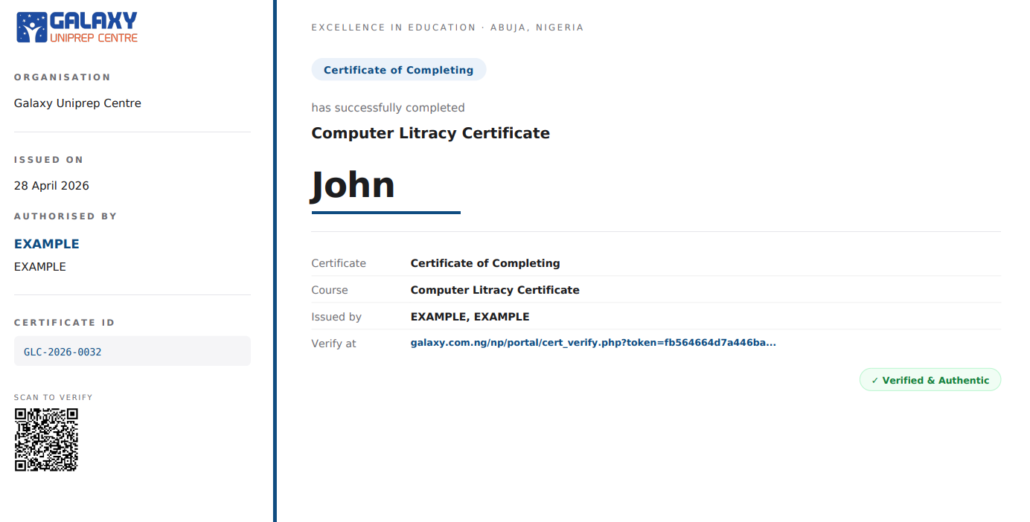
Galaxy has launched a public certificate verification portal at galaxy.com.ng/verify. Anyone with a Galaxy Certificate ID can now verify a certificate online in seconds — for free, with no account required.
Verify a Certificate
How to Verify a Certificate
- Go to galaxy.com.ng/verify
- Enter the Certificate ID printed on the document (for example,
GLC-2026-0001) - Click Verify
The portal returns the full record immediately. If the certificate is authentic, you’ll see a green Certificate Verified confirmation. If it has been revoked or cannot be found, the portal will tell you that as well.
You can also scan the QR code printed on every Galaxy certificate with any smartphone camera for one-tap verification.
What the Portal Shows
- Recipient name
- Certificate type and course or programme name
- Level, score, and duration
- Skills certified
- Issuer name and designation
- Issue date and validity period
- Unique Certificate ID
- SHA-256 integrity hash
Who It’s For
Employers and HR teams can confirm a candidate’s Galaxy certificate during hiring without phone calls or letters.
Universities and admissions officers can independently verify any Galaxy-issued credential as part of their review process.
Galaxy alumni can add the verification link to their LinkedIn profiles, CVs, and applications, so anyone can confirm the credential with one click.
Coming Soon: Blockchain Anchoring on Polygon
Coming Soon
Each certificate will be anchored on the Polygon blockchain, adding an independent cryptographic proof layer.
This feature is in development. Existing certificates will be retroactively anchored where possible, and we will announce the launch when it is live.
About Galaxy Uniprep Centre
Galaxy Uniprep Centre has operated since 2008, with offices in Abuja and Lagos and representation in Kano.
Try It Now
Verify Any Galaxy Certificate
Enter a Certificate ID and see the verified record in seconds.
Questions? Email info@galaxy.com.ng.